Overview
Building a high-value personal injury demand package starts with structured medical documentation. Lextiff's Injuries tracker lets your legal team log affected body parts, standardized ICD-10 diagnosis codes, pre-existing vs. acute traumatic causation, hospitalization dates, work disability status, and future care permanency directly inside the case record.
Step 1: Record Injury Diagnosis & ICD-10 Codes
- Navigate to your active case and select Detail under the CASE menu on the left sidebar.
- Locate the Injuries panel and click + Add.
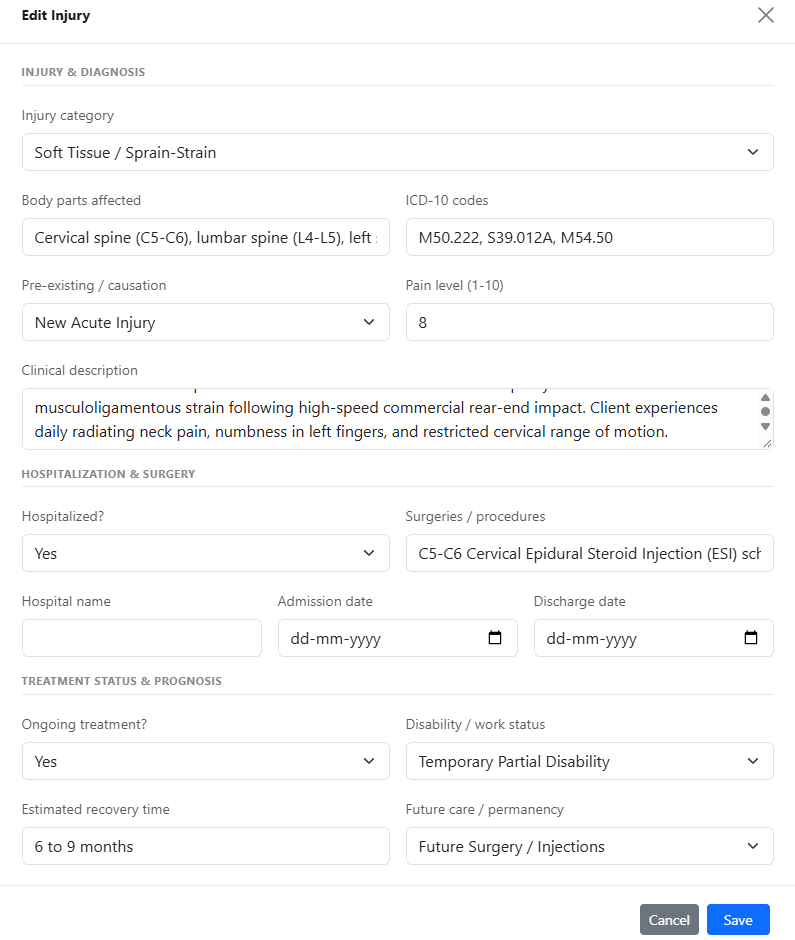
- Select the Injury category (such as Soft Tissue / Sprain-Strain, Fracture, or Traumatic Brain Injury) and specify the Body parts affected (e.g., Cervical spine (C5-C6), lumbar spine (L4-L5), left shoulder).
- Enter the corresponding ICD-10 codes (e.g.,
M50.222, S39.012A, M54.50) so billing ledgers and demand letters reference exact medical coding. - Set Pre-existing / causation (New Acute Injury vs. Aggravation of Pre-Existing Condition), record the client's reported Pain level (1-10), and enter a detailed Clinical description.
Step 2: Log Hospitalization, Surgeries & Future Care Prognosis
- Under Hospitalization & Surgery, set Hospitalized? to Yes to reveal conditional fields for Hospital name, Admission date, and Discharge date, and list scheduled or completed Surgeries / procedures (such as C5-C6 Cervical Epidural Steroid Injection).
- Under Treatment Status & Prognosis, indicate whether Ongoing treatment? is active, select the client's Disability / work status (e.g., Temporary Partial Disability), enter the Estimated recovery time, and flag Future care / permanency (such as Future Surgery / Injections).
- Click Save.
Step 3: Review the Visual Injury Summary Card
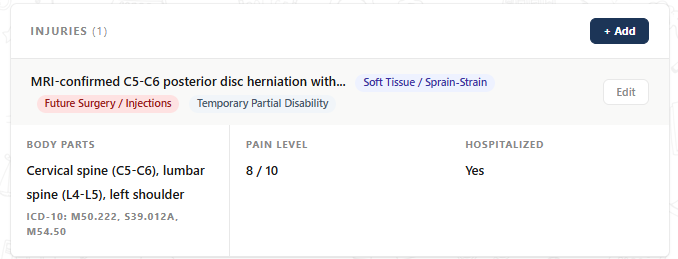
Once saved, Lextiff displays a color-coded summary card on the Detail screen highlighting future surgery flags, work disability badges, affected body parts, ICD-10 codes, pain scale ratings, and hospitalization status at a glance.