
Personal Injury Case Management Software: What Should Law Firms Look For?
Personal injury law firms manage more than client information and documents. A typical case can involve intake, accident details, insurance information, medical records, treatment timelines, expenses, liens, deadlines, communications, settlement negotiations, and financial distributions.
As caseloads grow, managing these activities across spreadsheets, email, shared folders, calendars, and separate applications can become increasingly difficult.
Personal injury case management software is designed to bring these workflows into a more structured environment. However, not every legal practice has the same requirements. A system that works well for one firm may not provide the workflow depth needed by another.
When evaluating case-management software, personal injury firms should therefore look beyond basic contact management and consider how well the platform supports the complete lifecycle of a case.
1. Case and Client Management
The foundation of any case-management system is a centralized case record.
The platform should allow the firm to maintain relevant client and case information in one place, including contact details, accident information, defendants, insurance information, injuries, witnesses, attorneys, staff assignments, and case status.
The goal is to give authorized team members a consistent view of the matter without searching through multiple systems.
2. Intake and Lead Management
Intake is the starting point for every new matter.
Useful software should support structured intake forms and workflows that capture the information required to evaluate a potential claim.
Firms may also benefit from features such as:
Custom intake fields
Public intake forms
Lead tracking
Conflict-check workflows
Case acceptance status
Automated intake tasks
Conversion from lead to case
A well-designed intake process can reduce repetitive data entry and establish a reliable case record from the beginning.
3. Medical Records and Chronology
Medical information can become one of the largest collections of data in a personal injury case.
Law firms should look for software that can organize medical providers, treatment dates, diagnoses, procedures, medical records, bills, and related information.
Medical chronology functionality can be particularly useful because it transforms a large collection of documents into a chronological treatment history.
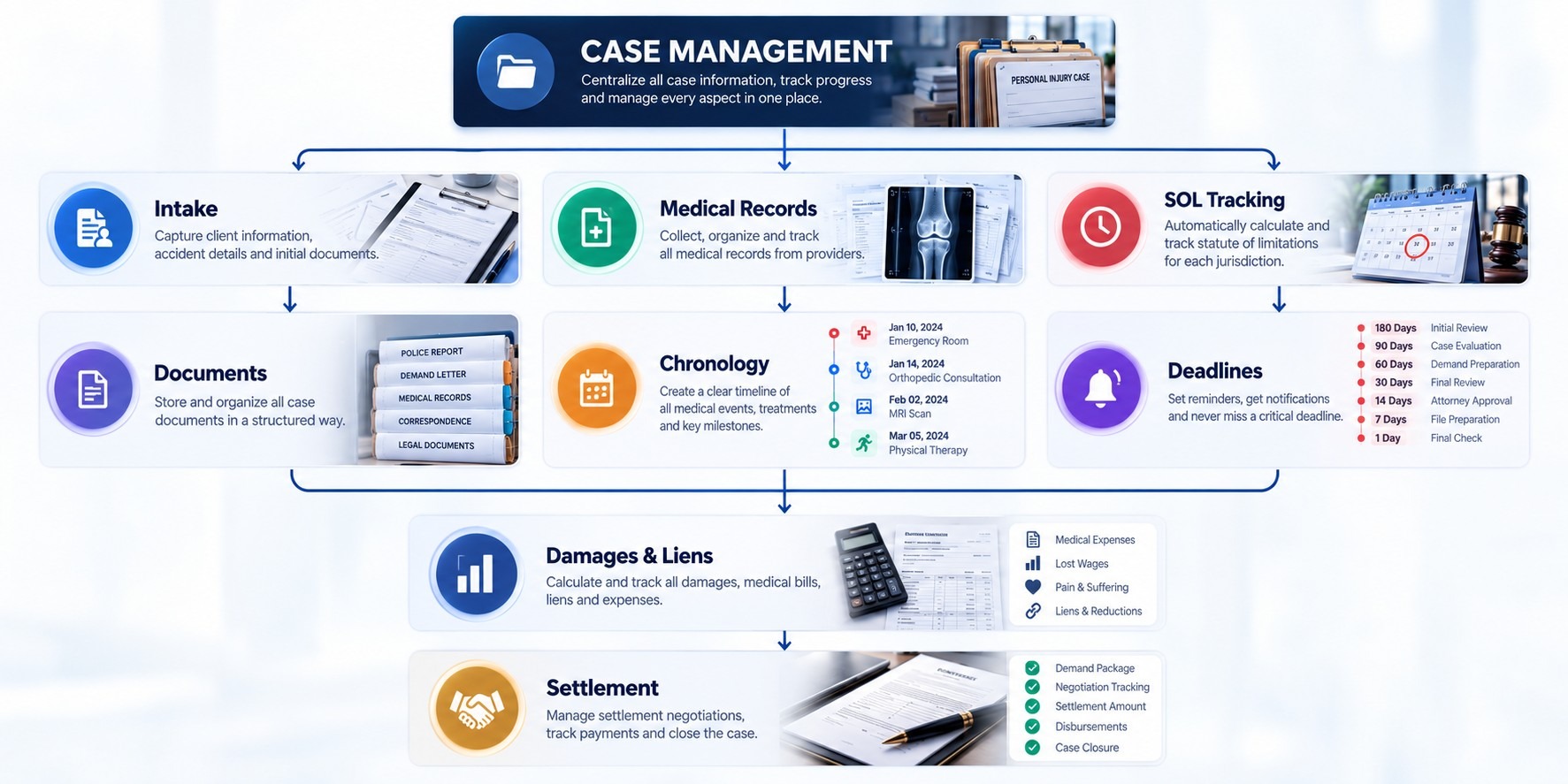
The firm should still be able to access the underlying records when detailed review or verification is required.
4. Statute of Limitations and Deadline Tracking
Deadline management should be a core consideration when evaluating personal injury software.
The system should allow firms to record and monitor important dates while providing configurable reminders and task assignments.
Useful capabilities may include:
SOL tracking
Custom deadline fields
Automated reminders
Escalation workflows
Deadline dashboards
Calendar integration
Assigned responsibility
Audit history
Technology can help organize and surface deadlines, but the applicable legal rule and final deadline should be appropriately verified by the legal team.
5. Document Management
Personal injury cases can generate substantial amounts of documentation.
The software should make it easy to upload, organize, search, categorize, and retrieve documents without forcing staff to navigate an increasingly complex folder structure.
Look for capabilities such as:
Case-based document organization
Document categories
Search
Version management
Secure sharing
Access permissions
Electronic signatures
Document activity history
The objective is to make the right document available when the team needs it.
6. Communication and Client Portal
Communication is another important part of personal injury case management.
A system may allow firms to record emails, calls, notes, messages, and other interactions against the appropriate case.
A client portal can provide an additional communication channel where clients can access selected case information, upload documents, complete forms, or receive updates.
The specific portal functionality required will depend on how the firm communicates with clients.
7. Expenses, Liens, and Damages
A personal injury case can involve more than medical bills.
The case-management system should help firms track relevant expenses, damages, liens, provider balances, and other financial information associated with the matter.
This information becomes particularly important during settlement preparation, when the team needs to understand the financial components of the claim.
8. Settlement Management
Settlement workflows deserve their own consideration.
A useful platform should allow the firm to move from demand preparation through negotiation and settlement without losing the financial and documentary history of the case.
Relevant capabilities may include:
Demand tracking
Offer and counteroffer history
Settlement calculations
Attorney fees
Case expenses
Liens
Client distribution
Trust-related information
Settlement documentation
Closing workflows
Connecting these components can reduce the need to reconstruct settlement information from multiple spreadsheets.
9. Workflow and Task Automation
The value of case-management software is not just storing information. It should help the firm manage what needs to happen next.
Firms should evaluate whether the software supports automated or repeatable workflows for activities such as:
Intake → Investigation → Treatment → Demand → Negotiation → Settlement → Closing
Tasks can then be assigned based on the case stage, responsible team member, or required action.
Automation can reduce repetitive administrative work while making responsibilities more visible.
10. Reporting and Case Visibility
Law firm leadership needs more than individual case screens.
Reporting tools can help firms understand their overall caseload and identify matters requiring attention.
Useful reporting areas may include:
Active cases
Cases by stage
Upcoming deadlines
Medical-record status
Outstanding tasks
Settlement pipeline
Case values
Expenses
Staff workload
A centralized dashboard can provide management with a higher-level view without requiring staff to manually consolidate information from different systems.
11. Security, Permissions, and Audit Trails
Legal case-management systems handle confidential client information, so security should be part of the software evaluation process.
Firms should examine:
Role-based permissions
User access controls
Authentication
Data encryption
Audit logs
Document access history
Backup processes
Data retention policies
The firm should also understand where its data is hosted, how backups are handled, and what security controls the provider maintains.
Security requirements should be evaluated alongside the firm's own policies and applicable legal or contractual obligations.
12. Integrations and Scalability
A case-management platform should fit into the firm's broader technology environment.
Depending on the firm's workflow, integrations may be important for email, calendars, accounting, document storage, electronic signatures, communication platforms, or other legal applications.
Scalability also matters. A system that works for a small team should not become difficult to manage as the firm adds attorneys, paralegals, cases, branches, or additional practice areas.
What Should Firms Ask Before Choosing Software?
Before selecting a platform, firms should evaluate the software against their actual workflow rather than choosing based solely on a feature list.
Useful questions include:
Can the platform handle our current caseload?
Can it support our case stages?
How does it manage medical records?
How are SOL deadlines calculated and monitored?
Can workflows be customized?
How are documents organized?
Can multiple users work on the same case?
What permissions are available?
How does settlement management work?
What reporting is available?
Which integrations are supported?
How is client data protected?
What happens if the firm needs to export its data?
Can the platform scale with the firm?
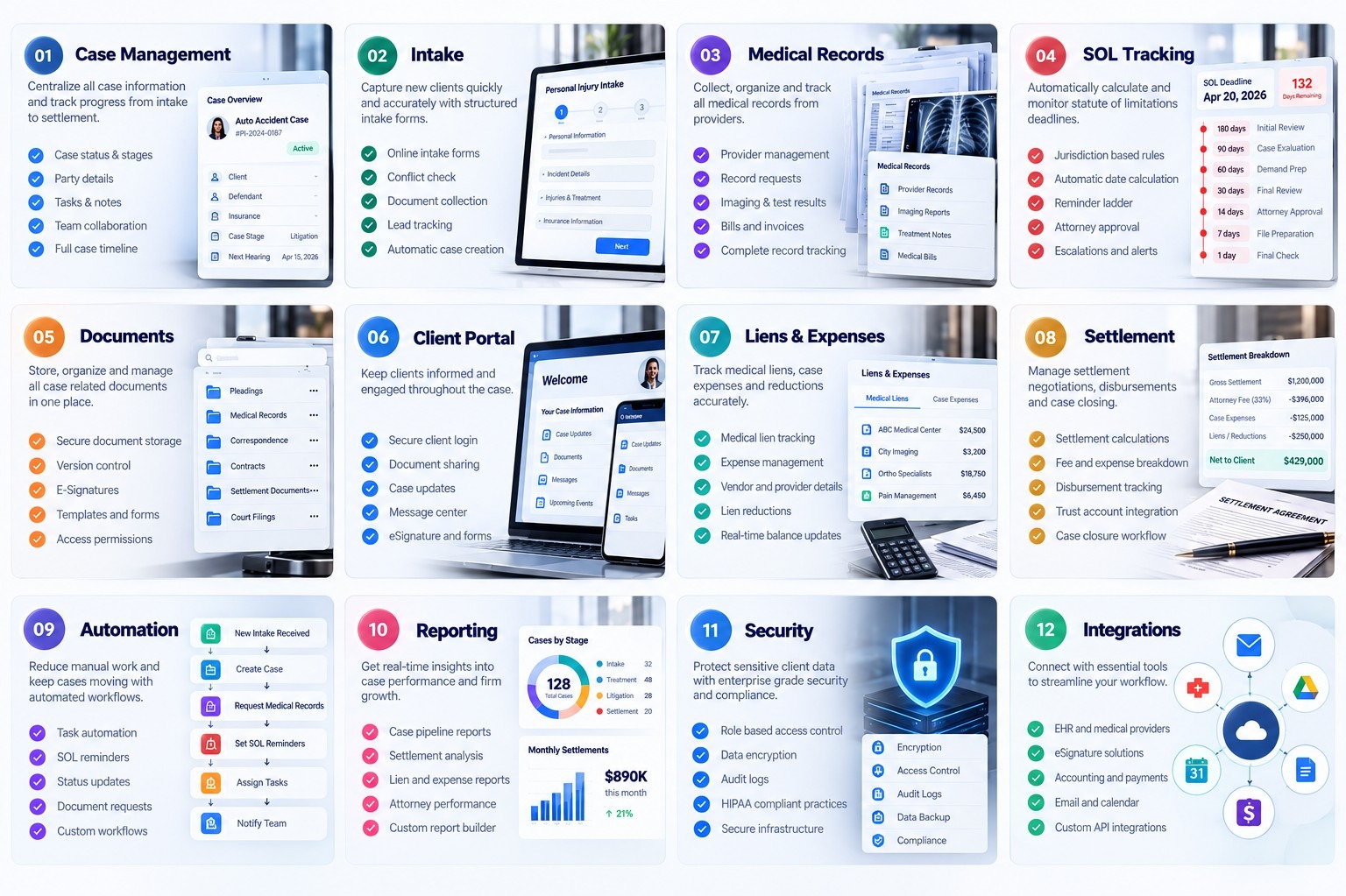
A product demonstration should ideally use a realistic personal injury case rather than a generic software walkthrough.
The Right Software Should Support the Firm's Workflow
The strongest case-management platform is not necessarily the one with the longest feature list.
The more important question is whether the software connects the activities that make up the firm's actual workflow.
For a plaintiff firm, that may look like:
Intake → Case → Medical Records → Deadlines → Damages → Demand → Negotiation → Settlement → Closing
When these components work together, the firm can manage a case as one connected process rather than as a collection of disconnected administrative tasks.
Final Thoughts
Choosing personal injury case-management software is an operational decision, not simply a technology purchase.
Firms should evaluate how the platform handles the complete case lifecycle, from intake and medical records through deadlines, documents, damages, negotiations, settlements, and closing.
The right system should make important information easier to access, responsibilities easier to track, and workflows easier to manage.
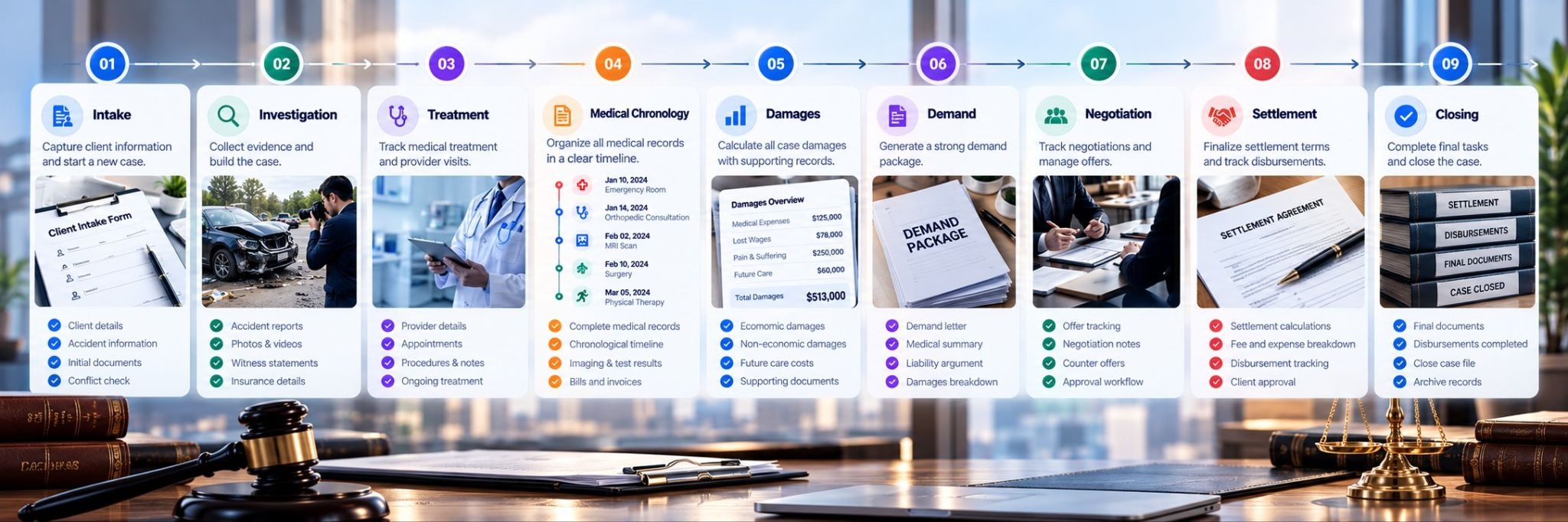
Most importantly, the software should fit the firm's actual way of working. A platform with sophisticated features is only valuable when those features translate into a more organized, consistent, and manageable case workflow.